ZapZap TV Media Player – Features, Setup, Compatibility and Download
Looking for a modern, powerful and easy-to-use Media Player for your television, smartphone or computer? ZapZap TV offers a convenient way to organize and play your personal media playlists through a clean interface designed for comfortable navigation and an enjoyable viewing experience.
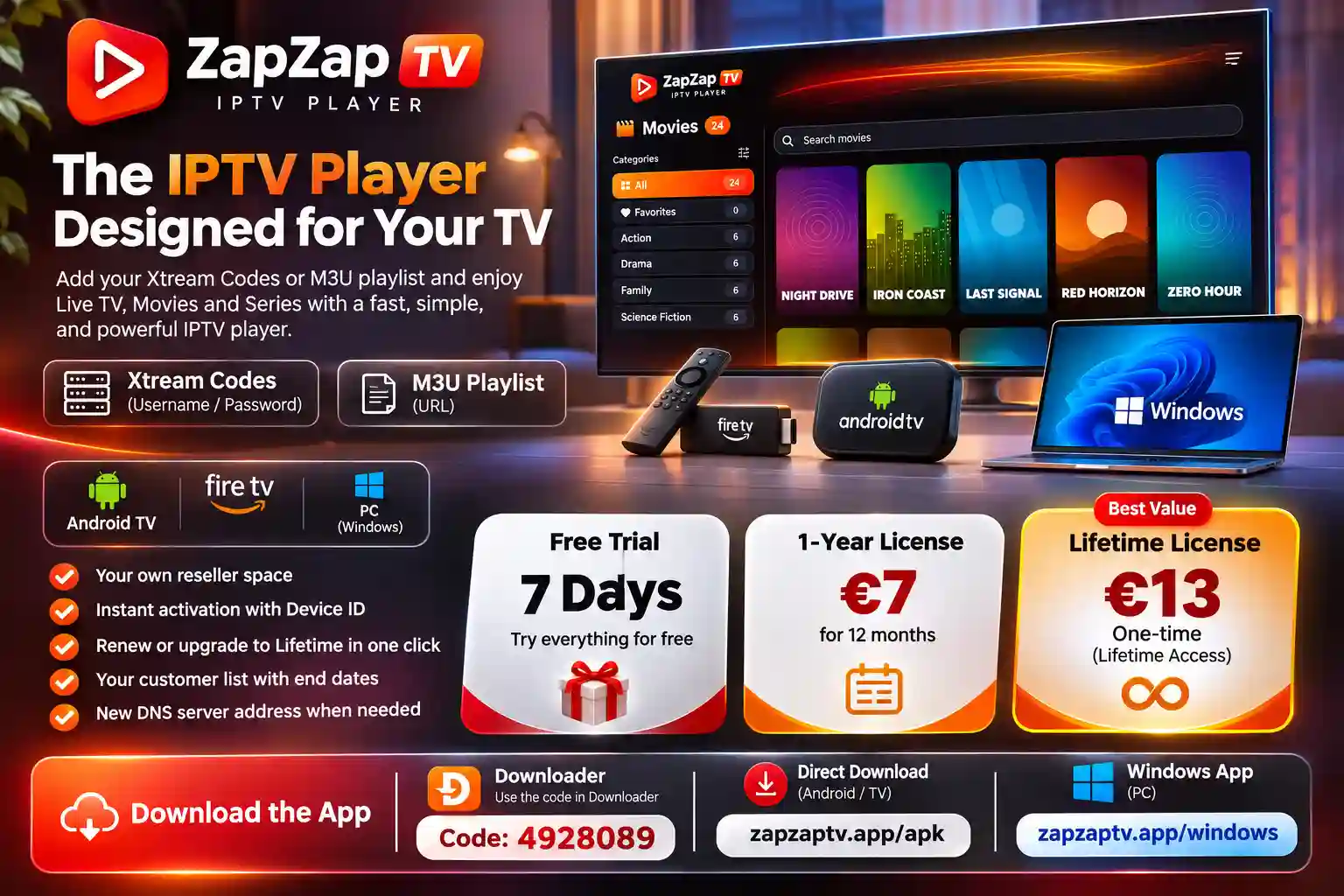
Designed for Android TV, Google TV, Amazon Fire TV Stick, Android smartphones, tablets and Windows computers, ZapZap TV brings Live TV, Movies and Series together in one organized application.
With support for Xtream Codes, M3U and compatible playlist formats, optional electronic program guides, parental controls, favorites and advanced browsing options, this Media Player provides practical tools for managing your personal media sources.
In this complete guide, discover everything about ZapZap TV, including its main features, supported devices, playlist management, installation instructions, activation options, pricing and reseller opportunities.
What Is ZapZap TV Media Player?
ZapZap TV is a multimedia application designed to organize and play content from playlists added by the user. It allows you to connect compatible media sources and browse available Live TV channels, Movies and Series from one application.
Unlike traditional entertainment platforms that provide their own content libraries, ZapZap TV works with playlists supplied by users through compatible providers or personal media sources.
The application supports popular playlist connection methods, including:
- Xtream Codes: Connect using your server address, username and password.
- M3U: Import an M3U playlist file or connect using an M3U URL.
- M3U8: Add compatible M3U8 playlist links.
- XMLTV: Add an optional electronic program guide when compatible data is available.
Users can also manage multiple playlists and switch between their available sources whenever they want.
Important: ZapZap TV is a Media Player. It does not provide, sell, host or distribute IPTV subscriptions, television channels, movies or series. Users are responsible for adding and accessing content they are legally authorized to watch.
Key Features of ZapZap TV
1. Clean and Modern User Interface
ZapZap TV features an organized interface that makes it easier to browse different media categories. Channels, movies and series are arranged in dedicated sections, helping users find their preferred content quickly.
The interface is designed especially for television screens, with visible selection indicators and navigation using the directional buttons of a compatible remote control.
2. Live TV and Electronic Program Guide
ZapZap TV provides a Live TV browsing experience with an electronic program guide when compatible guide information is available.
Users can benefit from:
- Channels organized by category.
- Current and upcoming program information.
- Program progress indicators.
- Channel search.
- Favorites management.
- Recently watched channels.
Understanding the Electronic Program Guide
An Electronic Program Guide, commonly known as EPG, displays television schedules and program information. When a compatible XMLTV source is configured, users can view available program details directly within the application.
EPG Information and Playlist Compatibility
The availability and accuracy of program schedules depend on the guide information supplied by the user's media provider.
Important EPG Note
Adding an EPG source is optional. The availability of program information depends on the compatibility and quality of the supplied guide data.
3. Movies and Series Library
ZapZap TV organizes movies and television series into a structured library, making content discovery more convenient.
Its media browsing features include:
- Movie and series posters.
- Organized seasons and episodes.
- Automatic grouping of series episodes.
- Recently watched content.
- Viewing progress and resume playback.
- Sorting by title, rating or release year.
When supported by the playback source, the application can remember your viewing position and allow you to resume watching from where you left off.
4. Xtream Codes and M3U Compatibility
One of the useful advantages of ZapZap TV is its support for different playlist connection methods.
Xtream Codes copyright
Connect your compatible media source using three essential details:
- Server URL.
- Username.
- Password.
M3U and M3U8 Playlists
Users can add a playlist by entering its URL or importing a compatible M3U file directly from their device.
XMLTV Program Guide
You can also add an optional XMLTV guide URL to display available television schedules and program information.
5. Multiple Playlist Management
ZapZap TV allows users to add several playlists and switch between them whenever necessary.
This is particularly useful for people who manage multiple authorized media sources and want to keep their content organized in one application.
6. Audio Tracks and Subtitle Controls
For a more comfortable viewing experience, ZapZap TV provides playback settings that allow users to customize available audio and subtitle options.
- Selecting the available audio track.
- Choosing available subtitles.
- Adjusting subtitle size where supported.
- Accessing playback options through the menu.
The available languages and tracks depend on the media source and stream.
7. High-Quality Video Playback
ZapZap TV supports compatible video streams with resolutions up to 4K, depending on the media source, device capabilities and available internet connection.
Users can organize channels according to their available video quality, helping them identify higher-resolution streams more easily.
Available quality categories may include:
- 8K.
- 4K Ultra HD.
- Full HD (FHD).
- HD.
- SD.
Actual playback quality depends on the source and the technical capabilities of the device.
8. Smart Content Organization
ZapZap TV gives users more control over how their playlists are displayed.
Available organization options include:
- Moving favorite categories to the top.
- Hiding categories you do not use.
- Removing hidden categories from search results.
- Viewing the number of channels, movies and series in each category.
- Displaying recently added movies and series first.
- Sorting movies and series alphabetically, by rating or by year.
9. Remote Control Optimized Navigation
ZapZap TV is designed to work comfortably with compatible television remote controls.
Navigation controls include:
- Up and Down: Navigate between channels.
- Left and Right: Skip forward or backward during compatible playback.
- Menu: Access available audio and subtitle settings.
- Directional Pad: Navigate menus and select content.
A visible focus indicator helps users identify the selected item while navigating the interface.
10. Parental Control and PIN Protection
ZapZap TV includes parental control functionality to help users manage access to restricted categories.
A PIN code can be used to lock adult categories, providing an additional level of control over the content displayed in the application.
Send a Playlist from Your Phone to Your TV
One particularly convenient feature of ZapZap TV is the ability to send a playlist from the official website directly to your device.
Entering long playlist URLs using a television remote control can be inconvenient. ZapZap TV provides an alternative that allows users to complete playlist configuration through a web browser.
How Does Playlist Transfer Work?
- Open ZapZap TV on your television or compatible device.
- Select Add from Website from the first screen or navigate to Settings and Playlists.
- The application displays your Device ID and a temporary six-digit code.
- Open the official Send a Playlist page on your phone or computer.
- Enter the Device ID and six-digit code.
- Choose your playlist type: Xtream Codes or M3U.
- Enter your playlist information and optional EPG guide URL.
- Send the playlist to your device.
- Open ZapZap TV and access your newly added playlist.
Official Playlist Transfer Page:
Secure Playlist Transfer
ZapZap TV provides security measures for its website-based playlist transfer system.
- Playlist information is encrypted in the browser before being sent.
- Only the intended device can open the transferred playlist.
- Transferred data is deleted from the server after the application receives it, according to the product information.
Users should always protect their playlist URLs, passwords, Device ID and temporary access codes, and avoid sharing them publicly.
Privacy and Data Protection
Protecting personal playlist information is an important consideration when using any multimedia application.
According to the product information, ZapZap TV includes the following privacy features:
- Encrypted playlist storage on the device.
- Encrypted parental control PIN information.
- Encrypted website-based playlist transfers.
- No advertising displayed in the application.
- No tracking.
Users should still protect their copyright credentials and only connect to trusted media sources.
Languages Supported by ZapZap TV
ZapZap TV supports multiple interface languages, making the application accessible to users from different regions.
- English.
- French.
- Arabic.
- Spanish.
Users can change the application language through the available settings.
Devices Compatible with ZapZap TV
ZapZap TV offers installation options for several popular devices and operating systems.
Android TV
Install ZapZap TV on a compatible Android TV device and enjoy remote-friendly navigation and organized media categories on your television screen.
Google TV
Google TV users can install the compatible Android TV application and manage their playlists through the application interface.
Amazon Fire TV Stick
ZapZap TV supports compatible Fire TV Stick devices. Installation is available through the Downloader application using the official Downloader code.
Android Smartphones and Tablets
Users can install the Android copyright on compatible smartphones and tablets and manage their media playlists through their mobile devices.
Windows PC
ZapZap TV also provides a dedicated Windows application for compatible Windows 10 and Windows 11 64-bit computers.
Supported Platforms at a Glance
| Platform | Availability |
|---|---|
| Android TV | Supported |
| Google TV | Supported |
| Amazon Fire TV Stick | Supported |
| Android Phones | Supported |
| Android Tablets | Supported |
| Windows 10 / 11 (64-bit) | Dedicated Application |
How to Download and Install ZapZap TV
Installing ZapZap TV is straightforward. Choose the installation method that corresponds to your device.
Method 1: Install ZapZap TV on Fire TV Stick
You can use the free Downloader application to install ZapZap TV on compatible television devices.
Official Downloader Code: 4928089
- Open the Amazon Fire TV home screen.
- Search for the Downloader application and install it.
- Navigate to Settings and open My Fire TV.
- Open Developer Options and allow installation from unknown apps for Downloader if required.
- Open the Downloader application.
- Enter the code 4928089.
- Press Go and wait for the copyright to download.
- Install ZapZap TV.
- Open the application and follow the activation instructions.
Alternative Download Method:
If the Downloader code does not work, enter the following official address directly into Downloader:
Method 2: Install ZapZap TV on Android Phones and Tablets
- Open Google Chrome on your Android device.
- Visit the official copyright download page.
- Tap Download the copyright.
- Wait until the download finishes.
- Open the downloaded copyright file.
- If Android requests permission, allow installation from Chrome.
- Tap Install and wait for the process to finish.
- Open ZapZap TV.
Official Android copyright:
Download ZapZap TV for Android
Method 3: Download ZapZap TV for Windows
Windows users can download the dedicated application for compatible Windows 10 and Windows 11 64-bit computers.
- Visit the official Windows download page.
- Click Download for Windows.
- Open the downloaded installation file.
- Review any Windows security warning before proceeding.
- Follow the installation instructions.
- Launch ZapZap TV from the Windows Start menu.
Official Windows Download:
Download ZapZap TV for Windows PC
ZapZap TV Pricing and Activation Plans
ZapZap TV offers a simple licensing structure with a seven-day free trial and two paid activation options.
Users can choose between a one-year license and a lifetime license. The displayed plans do not include automatic renewal.
Free Trial – 7 Days
New users can explore ZapZap TV for seven days without an initial payment.
- Seven days to try the application.
- Every available feature included during the trial.
- No payment required to start.
- No account creation required.
One-Year License – €7
The one-year license costs €7 per device and provides activation for twelve months.
- One device activated for one year.
- Application updates included.
- Activation within minutes.
- Renew whenever you like.
Lifetime License – €13
The lifetime license costs €13 per device as a one-time payment.
- One device activated for life.
- Application updates included.
- Activation within minutes.
- Transfer possible if you change devices.
- No automatic renewal.
ZapZap TV License Comparison
| License Plan | Price | Duration |
|---|---|---|
| Free Trial | €0 | 7 Days |
| 1-Year License | €7 | 12 Months |
| Lifetime License | €13 | Lifetime |
Best Value: The lifetime license offers long-term activation for a one-time payment of €13 per device.
How to Activate Your ZapZap TV License
After the free trial, users can activate their device by choosing one of the available license options.
- Open ZapZap TV on your device.
- Navigate to the Activation screen or license settings.
- Locate your Device ID.
- Follow the official activation instructions.
- Choose the one-year or lifetime license.
- Complete the activation process.
- Wait for your device to be activated.
According to the product information, activation is normally completed within minutes.
Visit the official ZapZap TV website for activation information.
Become a ZapZap TV Reseller
ZapZap TV also offers a reseller program for individuals and businesses interested in offering application activations to their customers.
Resellers can purchase credits and activate customer devices independently through their dedicated online reseller space.
ZapZap TV Reseller Credit System
| License Type | Credits per Device |
|---|---|
| 1-Year License | 1 Credit |
| Lifetime License | 2.5 Credits |
Benefits of Becoming a Reseller
- Online Reseller Dashboard: Access your own dedicated reseller space.
- Instant Device Activation: Activate customer devices using their Device ID.
- License Renewals: Renew or upgrade licenses with one click.
- Customer Management: Manage your customer list and monitor license expiration dates.
- DNS Management: New server addresses can be sent to customers' devices when required.
How to Become a ZapZap TV Reseller
Interested partners can visit the official reseller section to discover available offers and registration information.
Existing resellers can access their dedicated online dashboard to manage credits and customer activations.
Discover the ZapZap TV reseller program.
Frequently Asked Questions About ZapZap TV Media Player
What is ZapZap TV Media Player?
ZapZap TV is a multimedia application that allows users to organize and play their own compatible playlists, including Xtream Codes and M3U sources.
Does ZapZap TV provide IPTV channels?
No. ZapZap TV does not provide, sell or host IPTV channels, movies, series or subscriptions. Users must add their own authorized media playlists.
Does ZapZap TV support Xtream Codes?
Yes. Users can connect using their server URL, username and password.
Can I add an M3U playlist?
Yes. ZapZap TV supports compatible M3U and M3U8 links and M3U file imports.
Does ZapZap TV support EPG?
Yes. Users can add an optional XMLTV program guide to display television schedules when compatible guide data is available.
Can I add multiple playlists?
Yes. ZapZap TV supports multiple playlists, allowing users to switch between their available sources.
Does ZapZap TV support 4K playback?
Yes. The player supports compatible streams up to 4K resolution, depending on the source and device capabilities.
Does ZapZap TV include parental controls?
Yes. A PIN code can be used to lock restricted categories.
Can I send my playlist from my phone to my TV?
Yes. Open Add from Website in the application, obtain your Device ID and temporary code, then use the official playlist transfer page to send your playlist to your device.
Which languages does ZapZap TV support?
The application supports English, French, Arabic and Spanish.
Is ZapZap TV compatible with Firestick?
Yes. You can install the application on a compatible Fire TV Stick using Downloader code 4928089.
Can I install ZapZap TV on Windows?
Yes. A dedicated version is available for compatible Windows 10 and Windows 11 64-bit computers.
How much does ZapZap TV cost?
ZapZap TV offers a seven-day free trial, a one-year license for €7 and a lifetime license for €13 per device.
Does the lifetime license require yearly renewal?
No. The lifetime license is a one-time payment and does not require automatic yearly renewal.
Can I transfer my license to another device?
The lifetime license is advertised as transferable if you change devices. Contact the official support team for assistance.
Does ZapZap TV display advertisements?
According to the product information, ZapZap TV does not display advertisements in the application.
Download ZapZap TV Media Player
Discover a convenient way to organize and enjoy your personal media playlists with ZapZap TV.
Whether you use Android TV, Google TV, Fire TV Stick, an Android smartphone, a tablet or a Windows computer, ZapZap TV provides a dedicated application with playlist management, organized content browsing and practical playback controls.
Start with the seven-day free trial and explore the available features before choosing the license that suits your needs.
Official Download Links
- Android copyright: Download ZapZap TV copyright
- Windows PC: Download ZapZap TV for Windows
- Fire TV Stick: Downloader Code 4928089
- Send a Playlist: Transfer Your Playlist
Visit the official ZapZap TV Media Player website to download the application, discover its features, activate your license or explore the reseller program.
ZapZap TV – Your Media Player, Designed for Your TV.